
Imagine writing a personal letter, sealing it in an envelope, and handing it to a mail carrier. Now imagine that anyone who touches that letter along the way can slice it open, read every word, note who you are writing to, and reseal it without you ever knowing. You would never send a letter under those conditions.
Yet that is exactly what happens to your data every single time you go online without a VPN — a Virtual Private Network.
Every website you visit, every message you send, every account you log into — all of it travels through networks where strangers, companies, and even your own internet provider can see what you are doing.
Whether you want to lock down your personal data from hackers on public Wi-Fi, stop annoying geo-blocks from cutting you off on streaming platforms, or simply keep your internet service provider out of your private business, one tool fixes all of it: a VPN. It is not a luxury for tech experts — it is a basic necessity for anyone who uses the internet in 2026.
In this guide, we will walk you through exactly what a VPN is, how it works under the hood, the different types available, why you genuinely need one, and how to choose a provider you can actually trust — all in plain, jargon-free English.
What is a VPN?
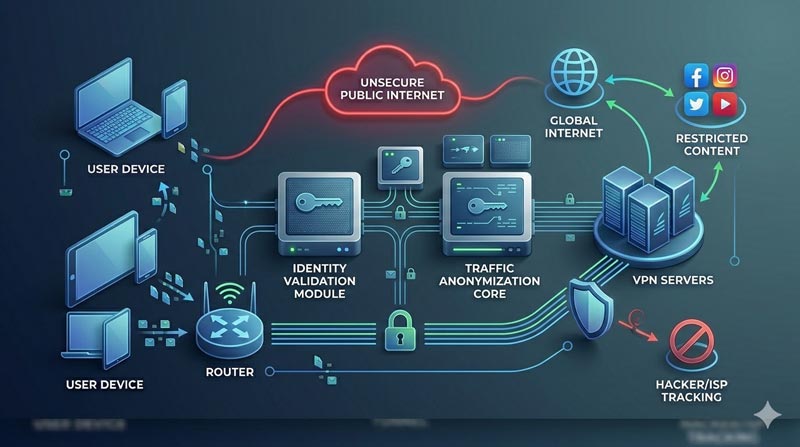
A VPN, or Virtual Private Network, is a security tool that establishes a safe, encrypted connection between your device (computer, smartphone, tablet) and the internet.
Think of it as a secure, private tunnel routed directly through the chaotic public highway of the internet. Once inside this tunnel, your data is hidden from prying eyes, and your actual physical location is masked behind an anonymous IP address.
How Does a VPN Work? (The Simple Breakdown)
To understand how a VPN works, let’s look at what happens without one versus with one.
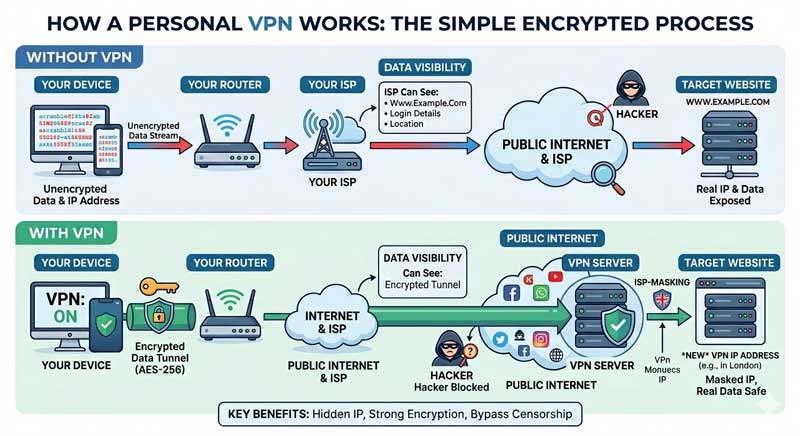
Without a VPN:
01
You type a website URL into your browser.
02
Your request goes directly to your Internet Service Provider (ISP).
03
Your ISP routes you to the website, but they can see every single page you visit, data you transfer, and location you browse from. This data is often logged and can be sold to advertisers or intercepted by cybercriminals.
With a VPN:
01
You launch your VPN application and connect to a secure server (e.g., a server in London).
02
The VPN software encrypts your data before it even leaves your device.
03
Your encrypted data travels through your ISP to the VPN server. To your ISP, the data looks like scrambled, unreadable gibberish.
04
The VPN server decrypts your data and sends it to the target website.
05
The website sees the request coming from the VPN server’s IP address in London, completely hiding your real identity and location.
The 4 Main Types of VPNs Explained
Not all VPNs serve the same purpose. Depending on whether you are an individual browsing the web or a massive corporation securing enterprise data, you will use a specific type of network architecture.
1
Personal (Consumer) VPN
This is the most common type of VPN used by everyday internet users. When you purchase a subscription from commercial providers like NordVPN or ExpressVPN, you are using a Personal VPN. It connects your individual device directly to the provider’s global server network, allowing you to mask your location, bypass geo-blocks, and encrypt your regular browsing traffic.
2
Remote Access VPN
A Remote Access VPN allows an individual user to connect securely to a private, localized corporate network over the internet. This is the gold standard for remote employees and digital nomads. It creates a secure tunnel so a worker sitting in a coffee shop can access internal company files, HR portals, and database servers exactly as if they were sitting physically at their desk in the office.
3
Site-to-Site VPN
Instead of connecting individual users to a network, a Site-to-Site VPN connects entire networks together. This setup is heavily utilized by companies with multiple physical locations. For example, if a business has a headquarters in Chicago and branch offices in London and Tokyo, a Site-to-Site VPN uses dedicated routing hardware to bridge all three separate local networks into one cohesive, permanently encrypted corporate WAN (Wide Area Network).
4
Mobile VPN
Standard VPNs can struggle when your device drops its connection or switches networks. A Mobile VPN is specifically designed to handle network instability. If you are a field engineer or an emergency responder shifting seamlessly between cellular data towers, public Wi-Fi hotspots, and physical ethernet connections, a Mobile VPN keeps the encrypted tunnel alive in the background without dropping your session or forcing you to re-authenticate.
Who is a VPN For?
A VPN isn’t just for tech geniuses or people with something to hide. It is designed for anyone who values their digital freedom and security. Specifically, it is a must-have tool for:
5 Crucial Reasons You Need to Start Using a VPN
1
Robust Data Encryption
A VPN uses military-grade encryption protocols (like AES-256) to scramble your data. Even if a hacker manages to intercept your connection, it would take billions of years for a supercomputer to crack the code.
2
Hide Your Digital Footprint
Your IP (Internet Protocol) address acts like your digital home address. A VPN masks your real IP and replaces it with one owned by the VPN service, preventing websites and trackers from building a profile on your browsing habits.
3
Bypass Geo-Blocking and Censorship
Ever clicked a video only to see “This content is not available in your region”? By connecting to a VPN server in a different country, you spoof your location, instantly unlocking global content, news, and streaming libraries.
4
Prevent ISP Throttling
Many ISPs intentionally slow down your internet speed if they detect you are doing bandwidth-heavy activities like streaming 4K video or gaming. Because a VPN hides what you are doing, your ISP can’t selectively throttle your connection.
5
Prevent ISP Throttling
Protect your financial credentials when checking your bank balance or making purchases online, ensuring your credit card details are never exposed to malicious actors.
Tested
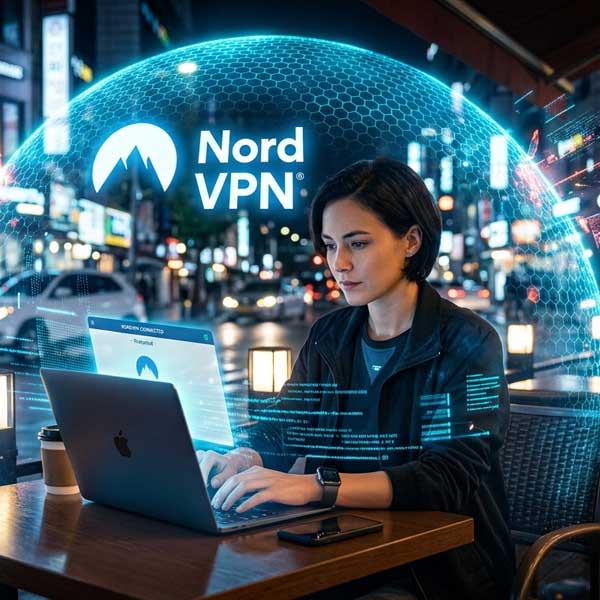
NordVPN stands out as a premium cybersecurity solution by offering robust military-grade AES-256 and ChaCha20 encryption alongside its custom, lightning-fast NordLynx protocol. Operating under a strict, independently audited no-logs policy, it hides users’ real IP addresses and virtual locations across a massive network of over 9,500 servers globally. Beyond traditional VPN capabilities, it integrates an all-in-one digital security suite featuring Threat Protection Pro to block malware, phishing, and intrusive ads, alongside Dark Web Monitor to scan for leaked personal information. For advanced privacy, users can utilize specialty servers like Double VPN (multi-hop encryption) and Onion Over VPN, while practical features like a customizable Kill Switch, Split Tunneling, and Meshnet ensure secure, uninterrupted remote connectivity across up to 10 simultaneous devices.
Contains affiliate links, meaning I may earn a commission if you click through and make a purchase, at no extra cost to you.
Step-by-Step: How to Use a VPN
Getting started with a VPN is incredibly easy and takes less than five minutes. Follow these simple steps:
Step 01
Choose a reputable VPN provider
Look for premium options like ExpressVPN, NordVPN, or Surfshark. Sign up for a subscription plan directly on their official website.
Step 02
Download and install the app
Install the proprietary VPN software on your preferred devices. Most trusted providers offer dedicated native apps for Windows, macOS, iOS, Android, and Linux.
Step 03
Log in to your account
Open the newly installed app on your machine and enter the secure credentials you created during your initial registration.
Step 04
Select a target server location
You can click “Quick Connect” to automatically find the fastest local node, or manually select a specific country from the provider’s server map or alphabetical list.
Step 05
Activate the secure connection
Click the main connection toggle button. Once the app status changes to “Connected” or turns green, your entire internet footprint is fully encrypted and secure.
Key Considerations When Choosing a VPN
Not all VPNs are created equal. Before you hand over your money, ensure your chosen provider meets the following criteria:


Warning: Red Flags and Things to Avoid
While VPNs are fantastic tools, there are dangerous traps to watch out for:
Frequently Asked Questions (FAQs)
Is using a VPN legal?
Yes, using a VPN is perfectly legal in the vast majority of countries around the world, including the US, UK, Canada, and Europe. However, any illegal activity you commit while connected to a VPN (such as downloading copyrighted material or hacking) remains completely illegal. Additionally, a few countries like China, Russia, and North Korea heavily restrict or outright ban non-government-approved VPN services.
Will a VPN slow down my internet connection?
Technically, yes. Because a VPN has to encrypt your data packets and route them through an extra intermediary server, you will usually experience a slight drop in speed. However, premium VPNs utilize ultra-fast servers and lightweight, modern protocols like WireGuard or OpenVPN over UDP, making the speed difference practically unnoticeable for streaming, gaming, or daily browsing.
Can my Internet Service Provider (ISP) see what I do when using a VPN?
No. Once you turn on your VPN, your ISP can no longer see the specific websites you visit, the pages you read, or the files you download. The only thing your ISP can see is that you are connected to an external VPN server and that your data traffic is completely encrypted.
Does a VPN protect me from viruses and malware?
No, a VPN is not a replacement for high-quality antivirus software. A VPN protects your data privacy and encrypts your connection, but if you intentionally download a malicious file or click a phishing link, a VPN will not stop a virus from infecting your machine. For absolute security, you should use both a VPN and a reliable antivirus scanner simultaneously.
Can I use a VPN on multiple devices at the same time?
Yes! Almost all premium, commercial VPN providers allow you to use a single account on multiple devices concurrently. The specific limit varies by vendor—some offer 5 to 10 simultaneous connections, while others provide completely unlimited device connections per subscription.
The Bottom Line
In an era where our lives are lived almost entirely online, a VPN is no longer a luxury—it is an essential tool for digital self-defense. It restores your right to anonymity, keeps your private conversations private, and unlocks the true, borderless potential of the internet.
Investing a few dollars a month into a premium VPN provider is a small price to pay for absolute peace of mind every time you open your laptop or tap your smartphone screen. Stay safe, stay encrypted!
Affiliate Disclaimer: This article contains affiliate links, meaning I may earn a commission if you click through and make a purchase, at no extra cost to you.