
Development Tools
Discover how our comprehensive solutions empower your journey.
MS Access
A powerful database management system used to build desktop-based business applications such as payroll systems, inventory management, attendance systems, reporting dashboards, and CRUD applications. I use MS Access extensively for developing practical project-based tutorials and rapid business solutions.
VS Code
A lightweight yet powerful source-code editor that supports multiple programming languages, extensions, debugging tools, Git integration, and AI-powered development workflows. I use VS Code for coding, project management, web development, and editing tutorial-related resources.
XAMPP
An easy-to-use local server environment that includes Apache, MySQL, PHP, and Perl. I use XAMPP for testing web applications, running local databases, developing PHP projects, and creating deployment tutorials before publishing projects online.
Microsoft IIS
A flexible and secure web server platform from Microsoft used for hosting ASP.NET applications, APIs, and enterprise web solutions on Windows servers. I use IIS for deployment tutorials, local hosting environments, and managing Windows-based web applications.
Hosting & Deployment
Discover how our comprehensive solutions empower your journey.
Hostinger
A reliable and beginner-friendly hosting platform that I use for hosting websites, deploying web applications, managing domains, and testing development projects. Hostinger provides an easy control panel, fast performance, and affordable VPS and shared hosting solutions suitable for students, developers, and small business projects.
Recommended for:
GoDaddy
A lightweight yet powerful source-code editor that supports multiple programming languages, extensions, debugging tools, Git integration, and AI-powered development workflows. I use VS Code for coding, project management, web development, and editing tutorial-related resources.
Recommended for:
SmarterASP
A Windows-based hosting platform specialized in ASP.NET and SQL Server hosting. I use SmartASP.NET primarily for SQL Server database hosting and testing enterprise-style applications. One of the most useful features for learners and developers is their free trial environment, which helps test projects before production deployment.
Recommended for:
Key Highlight:
Offers free trial hosting options for testing and development environments.
Some tools and hosting platforms listed on this page may contain affiliate links. I only recommend services and resources that I personally use, test, or find valuable for development and learning purposes.
Content Creation Tools
Discover how our comprehensive solutions empower your journey.

OBS Studio
A powerful free and open-source software used for screen recording, live streaming, and tutorial creation. I use OBS Studio to record coding tutorials, software demonstrations, project walkthroughs, and educational content with customizable scenes and professional-quality output.
Recommended for:
Adobe Photoshop
An industry-standard image editing and graphic design software used for creating thumbnails, banners, UI mockups, and visual assets. I use Photoshop for designing tutorial graphics, YouTube thumbnails, website visuals, and promotional content.
Recommended for:
Adobe Premiere Pro
A professional video editing software used for editing tutorials, project walkthroughs, educational videos, and promotional content. I use Premiere Pro for timeline editing, transitions, audio enhancement, subtitles, and exporting high-quality video tutorials.
Recommended for:
Mixkit
A free resource platform that provides high-quality video templates, stock videos, music tracks, sound effects, and creative assets for content creators. I use Mixkit to enhance tutorial videos, intro sequences, transitions, background music, and visual effects for YouTube and educational content production.
Recommended for:

CorelDraw
A professional vector graphic design software used for creating logos, banners, illustrations, printable graphics, and design layouts. I use CorelDRAW for scalable graphic design work, branding assets, and professional layout creation.
Recommended for:

Microsoft Clipchamp
A simple and beginner-friendly video editor that works well for quick edits, screen recordings, subtitles, and lightweight content creation workflows. I use Clipchamp for fast editing tasks, social clips, and lightweight tutorial production.
Recommended for:
Hardware & Workspace Setup
Discover how our comprehensive solutions empower your journey.
HP Z23n G1 Monitor
A professional 23-inch IPS monitor that I use as part of my dual-monitor development and content creation setup. The HP Z23n G1 provides excellent color accuracy, Full HD resolution, and wide viewing angles, making it suitable for programming, multitasking, video editing, and project management workflows.
Key Features:
Dell P2412H Monitor
A reliable professional-grade monitor used for multitasking, project development, and extended productivity workflows. I use the Dell P2412H as a secondary display for managing tutorials, coding environments, documentation, and media assets simultaneously.
Key Features:
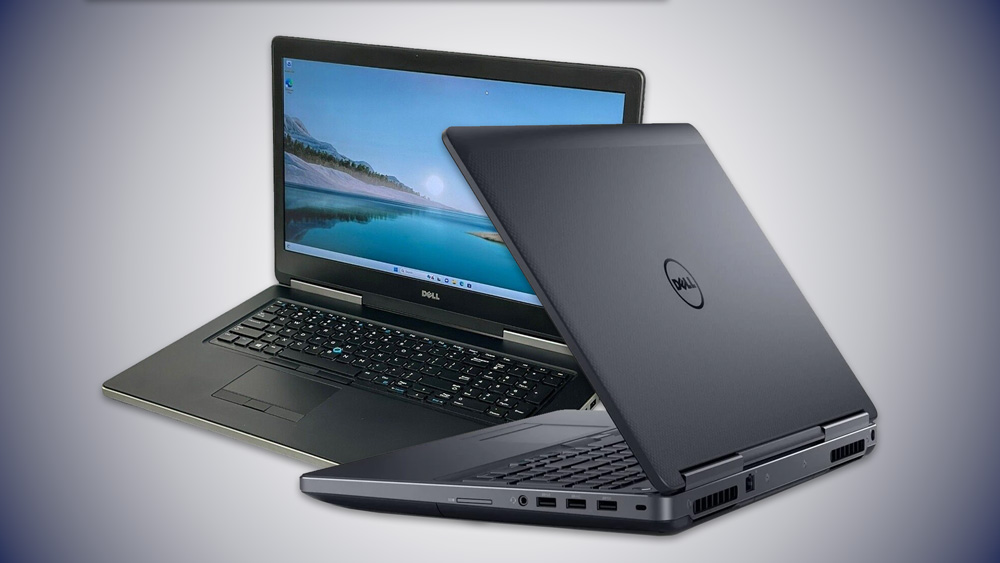
Dell Inspiron 7720 Laptop Workstation
A powerful customized mobile workstation that I use for software development, database projects, video editing, graphic design, virtualization, and content creation workflows. Despite being an older-generation laptop, the upgraded hardware configuration still handles demanding development and multimedia tasks efficiently.
Key Specifications
Used for
Why I Still Use It
The upgraded RAM, SSD storage, and professional Quadro GPU make it a highly capable workstation for development, multimedia editing, and technical project workflows even today.